St. Joseph Medical Corp

The Complete Marketing System

How every prospect flows from ad click to CGM device shipment — Zoho CRM, Zapier automations, PVerify insurance verification, and the workflows that connect it all.

End-to-End Patient Acquisition
The full journey from a Google/Meta ad click to a CGM device shipped to the patient's door — across 6 connected systems.
Step 1

Traffic Acquisition

Google Ads (PMax + Search) and Meta Ads (26 segment-based campaigns) drive prospects to the website form.

Step 2

Form Submission

Patient fills out a CGM request form on one of two websites. This fires the Zapier workflow chain.

Step 3

Zapier to Zoho

4 Zapier Zaps fire simultaneously — creating the Zoho record, normalizing timezone, running the Full Benefit Report, and assigning the Prospect ID.

Step 4

Insurance Verification

PVerify checks insurance, eligibility, and duplicate status. 3 gates must pass (Insurance Found, Eligibility Passed, Same/Similar Passed).

Step 5

Qualification Pipeline

Prospects move through Verification Complete, In Chase, and final verification stages. Failures route to specific team members for manual intervention.

Step 6

Device Shipment

Fully qualified patients receive their CGM device (FreeStyle Libre or Dexcom). Conversion signals feed back into Google Ads for optimization.

Google Ads + Meta Ads
Two ad platforms drive all prospect traffic to the website forms.
G

Google Ads (V2 Account)

Performance Max + Search

PMax General Active — Workhorse
PMax New Site Active
Search (Website Form) Low Budget
M

Meta Ads

26 Segment-Based Campaigns

CRM-stage retargeting architecture: each patient segment (HMO, Just Turned of Age, No Contact, Denied By Patient, Bad DOB, P Match) gets 3 targeting variants:

Suggestion Lookalike No Suggestion

Plus General cold traffic campaigns for net-new patient acquisition.

Website Form to Zoho CRM
When a patient submits the form, a chain of events fires within seconds — creating their record and triggering all initial automations.
1

Patient Submits Form

One of two STJ websites collects: name, DOB, phone, insurance info, diabetes type, and device preference (FreeStyle Libre / Dexcom).

2

Zapier Fires 4 Zaps Simultaneously

Within seconds of form submission, 4 independent Zapier workflows trigger in parallel — each handling a different piece of the onboarding process.

Zap 1: Create Zoho Record Zap 2: Normalize Timezone Zap 3: Full Benefit Report Zap 4: Assign Prospect ID
3

Zoho Record Created — Stage: New Prospect

The prospect lands in Zoho CRM. 8+ workflow rules fire automatically: round-robin owner assignment, confirmation email sent, timezone updated, prospect ID generated, and the Full Benefit Report is created.

4

PVerify Insurance Verification

The Full Benefit Report Zap calls PVerify to look up the patient's insurance. 3 gates must pass: Insurance Found, Eligibility Passed, Same/Similar Passed.

5

Stage Routing

Based on PVerify results, the prospect routes to either the happy path (Verification Complete, In Chase, Patient) or a failure/stalemate stage requiring manual intervention.

6

Offline Conversion Signals

Key stage transitions (In Chase, Sales) fire conversion signals back into Google Ads via Zoho CRM sync, enabling the ad algorithm to learn which clicks produce real patients.

The 4 Zaps That Fire on Every New Prospect
When a form is submitted, these 4 Zapier workflows trigger simultaneously within seconds. Together they create the Zoho record, set timezone, run insurance verification, and assign the prospect ID.
1

NEW FORM to Zoho v53

2 Tasks
Trigger: Website form submission
Action: Create Prospect in Zoho CRM
T
Trigger: Webhook catches form data (name, DOB, phone, insurance, device preference, UTM params, GCLID)
A
Action: Creates a new Prospect record in Zoho CRM Prospects module with all form fields mapped. Sets stage to "New Prospect".
2

Normalize Timezone (Prospects) FIXED + TP V2

2 Tasks
Trigger: New Prospect created in Zoho
Action: Update timezone field
T
Trigger: Fires when a new Prospect record is created in Zoho CRM
A
Action: Normalizes the prospect's timezone based on their location data. Ensures all time-based automations (text campaigns, follow-up calls) fire at appropriate local times.
3

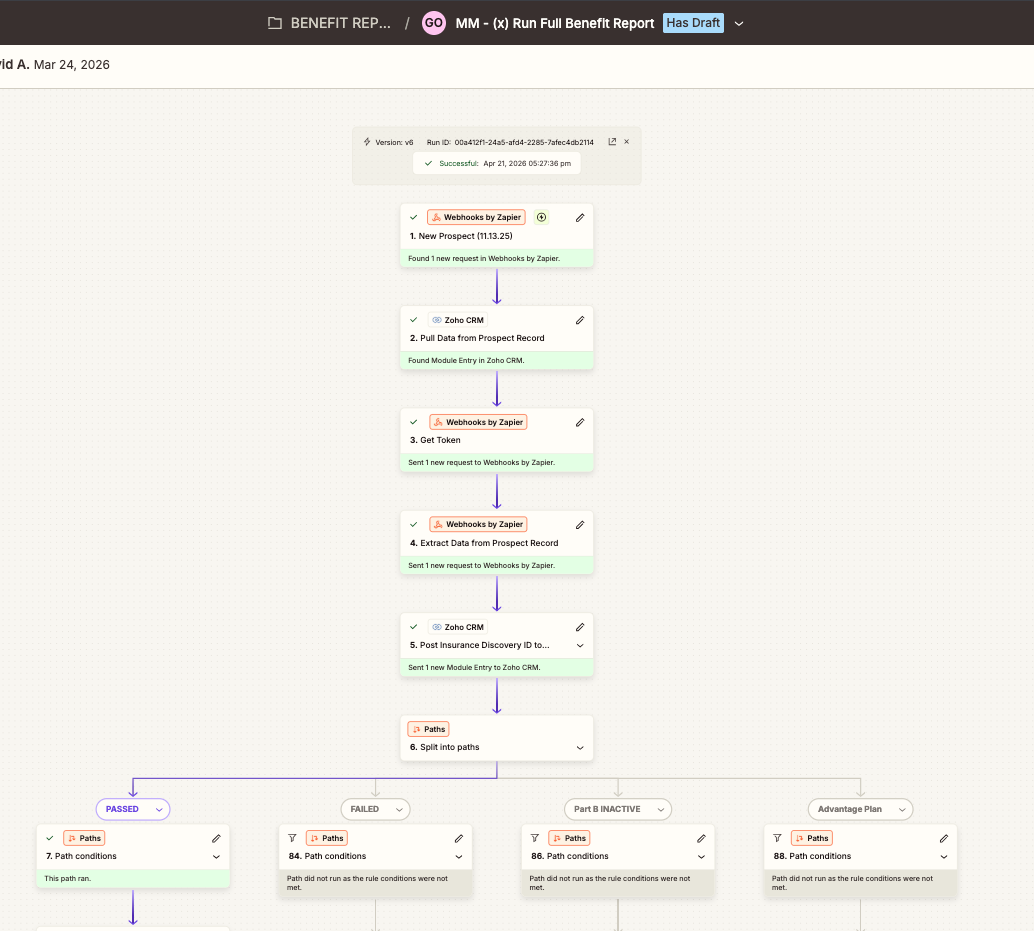
Run Full Benefit Report v6 — 89 Steps

21 Tasks / 89 Steps
Trigger: Webhook from Zoho (New Prospect)
Core Action: PVerify insurance verification
Complexity: 89/100 steps used, 6 branching paths

This is the main automation engine. It calls PVerify to verify insurance, checks eligibility, runs duplicate detection, and routes the prospect based on the results. The Zap uses nearly all 100 available Zapier steps.

Detailed breakdown in Section 08 below.

4

Update Primary ID in Prospect Module FIXED

1 Task
Trigger: Prospect record created
Action: Generate and assign Primary ID
A
Action: Generates a unique Primary ID (e.g., 5TV0XW1GF09) and writes it back to the Zoho Prospect record. This ID is used for cross-system tracking across Zoho, GHL, and billing.

Real Zap Run — Sharon Sanford (In Chase Prospect)

All 4 zaps fired within 53 seconds of the form submission.
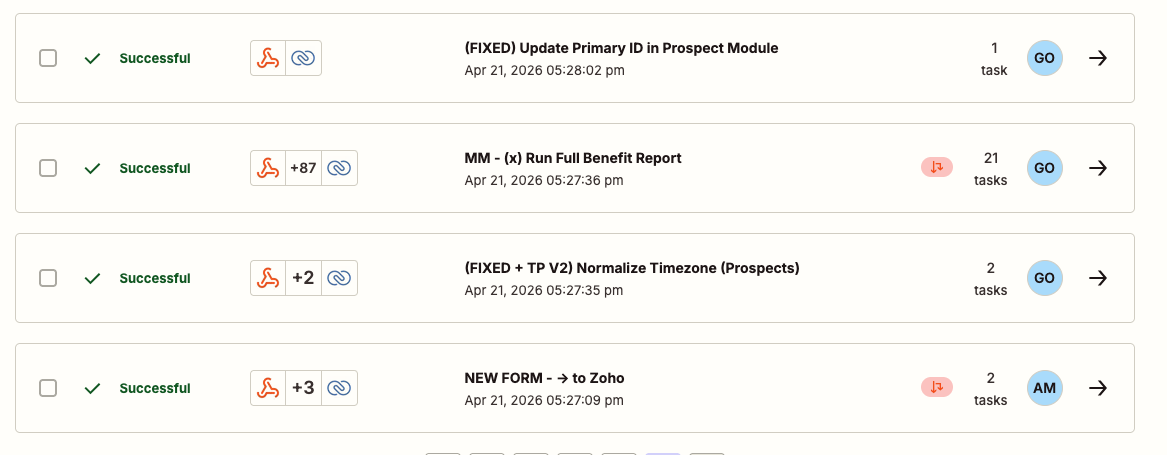
Zap runs overview
Zap Runs Overview — 4 Zaps Fired
Full Benefit Report steps
Full Benefit Report — 21 Tasks, 89 Steps
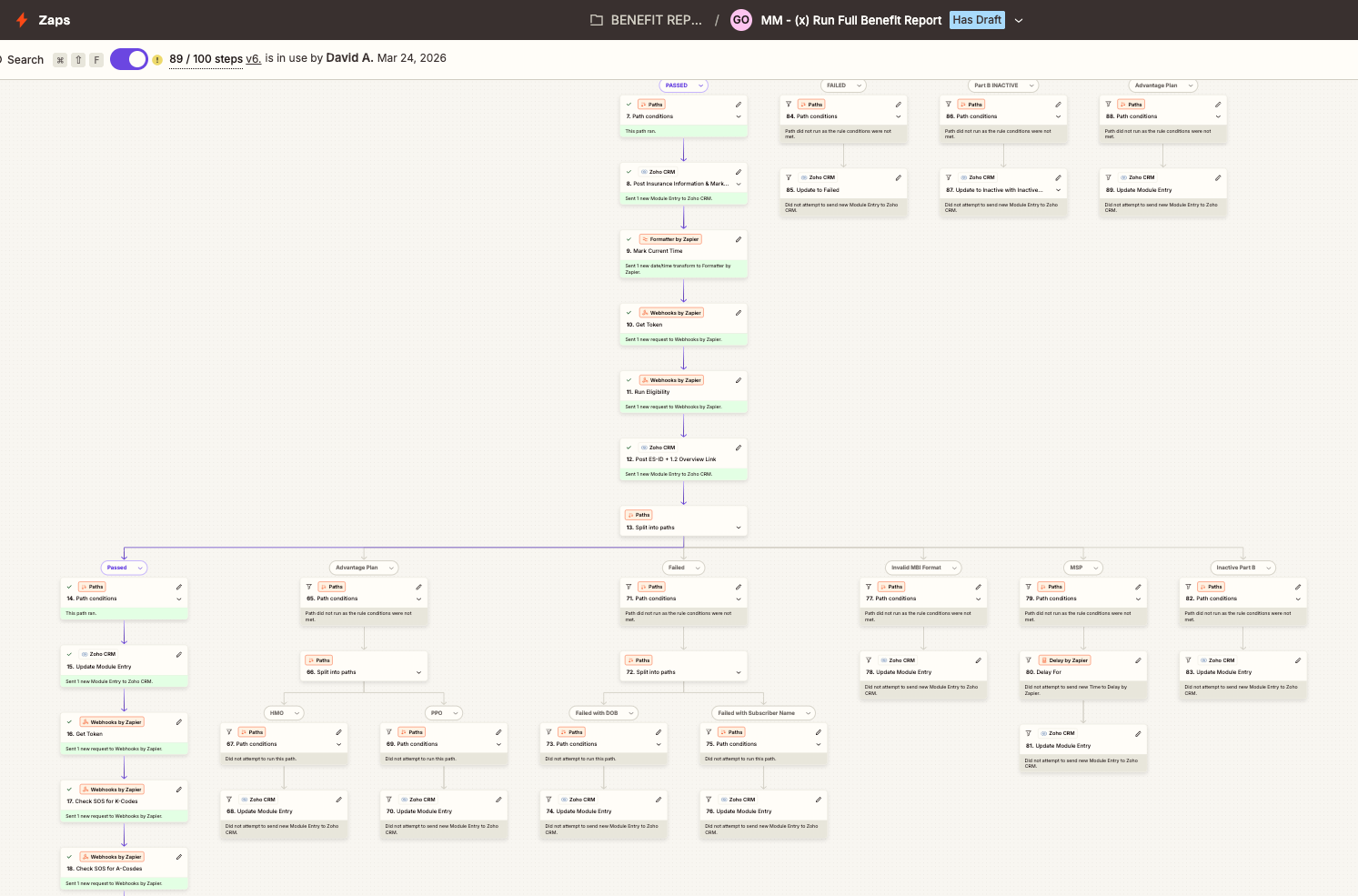
Benefit Report step detail
Benefit Report — Insurance Discovery + Paths
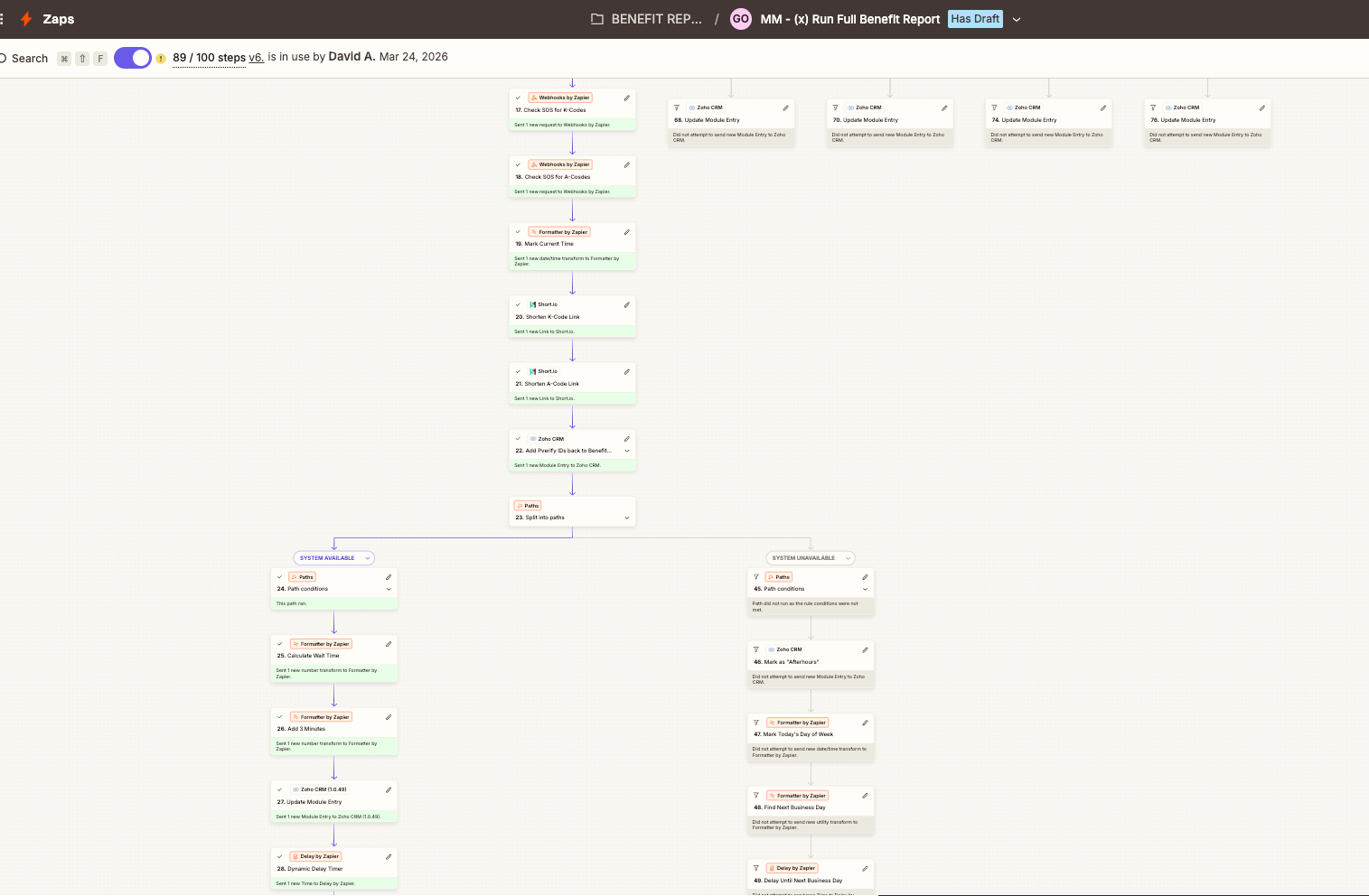
Benefit Report branching
Branching Paths — PASSED / FAILED / Advantage
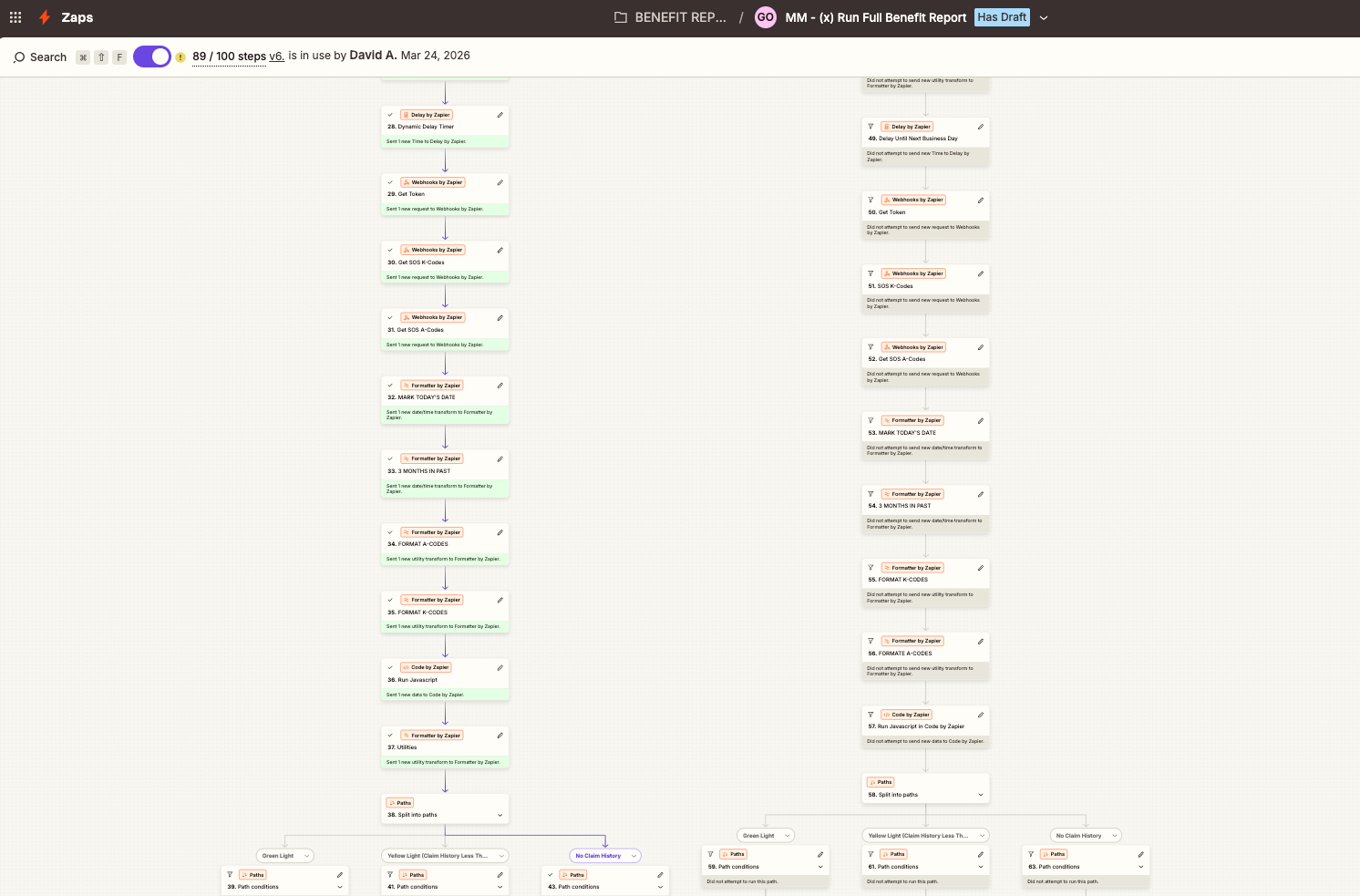
Eligibility check
Eligibility Check + SOS Code Verification

Sub-branches
Sub-Branches — HMO / PPO / Invalid MBI

Timezone normalization zap
Timezone Normalization + Primary ID Zaps
PVerify — The 3 Gates
Every prospect must pass 3 automated checks via PVerify before advancing. If any gate fails, the prospect routes to a failure or stalemate stage for manual review.

Gate 1: Insurance Found

PVerify runs an Insurance Discovery search. Must return "Found" status. If not found, routes to Validator Warning for manual lookup.

Gate 2: Eligibility Passed

Eligibility check validates the insurance plan covers CGM devices. Checks for HMO restrictions, inactive Part B, and advantage plans.

Gate 3: Same/Similar Check

Checks SOS (Schedule of Services) for K-Codes and A-Codes to detect if the patient already has a CGM or similar device. Passes if no conflicts found.

When a Gate Fails

Insurance Not Found — Routes to Validator Warning. STJ team manually searches for insurance info by calling the patient.

Eligibility Failed — Routes to specific failure bucket (HMO, Inactive Part B, Advantage Plan) based on the reason.

Same/Similar Conflict — Patient already has a CGM. Routes to Same/Similar Pending for manual review.

Invalid MBI Format — Medicare Beneficiary Identifier format is wrong. Routes to team for correction and retry.

Every Stage in the Pipeline
Prospects flow through 3 possible paths: the happy path to becoming a patient, a failure/disqualification path, or a stalemate path requiring manual intervention.

Happy Path

New Prospect Full Benefit Report Verification Complete In Chase SOS Verification Final Verification Welcome Call Ready To Ship Patient (Shipped)

Pending / Manual Intervention

These stages require the STJ team to take manual action — calling the prospect, their doctor, or their insurance company.

Validator Warning NEED MD Need MD Info NEED RX Alicia's Pending Gayana's Pending High CoPay HMO Same / Similar Pending Pending Verification Pending Auth Pending CoPay

Failed / Disqualified

Terminal stages where the prospect cannot be qualified. Some can be retried periodically.

Non-Insulin Bad Insurance Bad / Ineligible State Under Age Bad DOB No Contact Denied By Patient Denied by MD Deceased Already Has Duplicate Hospice Advantage Plan Inactive Part B Invalid MBI MSP (Medicare Secondary Payer) Provider Issue
15 Workflow Rules Inside Zoho
These workflow rules fire automatically at various trigger points — prospect creation, stage changes, and verification results.
Workflow RuleTriggerWhat It Does
Roundrobin for Intake TeamProspect CreatedAssigns prospect owner via round-robin to intake team members
Update to Non-Insulin on CreationProspect CreatedIf prospect is non-insulin dependent, reassigns owner to Jennifer Gibbons
Update Upload Time and OwnerProspect CreatedSets the Upload Date timestamp on the prospect record
Mark Created TimeProspect CreatedStamps the Create Time field for reporting and SLA tracking
Update TimezoneProspect CreatedFires a webhook to normalize the prospect's timezone based on location
CC2 - Stage is New ProspectStage = New ProspectSends confirmation email to patient: "Your CGM request has been received"
On Create - Run Full/Partial Benefit ReportProspect CreatedCreates the Benefit Report record that triggers PVerify verification
autoFillProspectIDProspect CreatedAuto-generates a unique Prospect ID (e.g., 4890925000385012813)
Sync Lead to BackendProspect CreatedSyncs the lead to external backend + creates email-to-SMS address
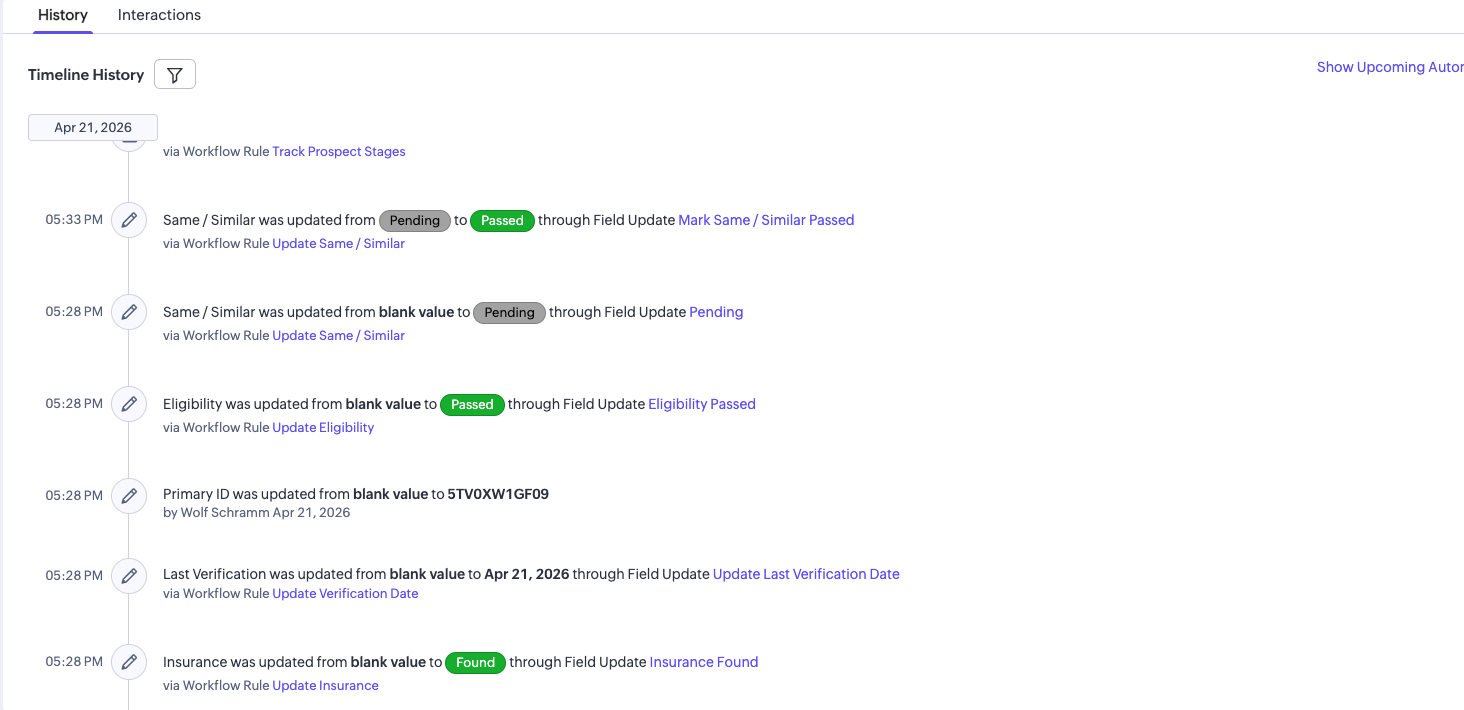
Update InsurancePVerify ResultMarks Insurance field as "Found" (green badge) when PVerify returns positive
Update Last Verification DatePVerify ResultTimestamps when the last insurance verification was run
Update EligibilityEligibility CheckMarks Eligibility as "Passed" (green badge) after eligibility verification
Update Same / SimilarSOS CheckSets Same/Similar to "Pending" (gray badge) while checking for existing CGM devices
Mark Same / Similar PassedSOS Check CompleteUpdates Same/Similar from "Pending" to "Passed" (green badge) when no conflicts found
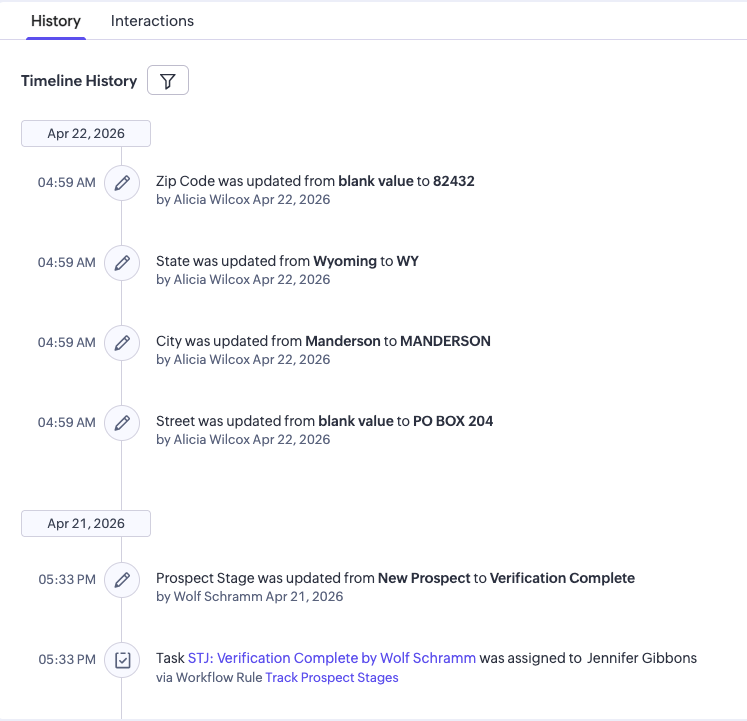
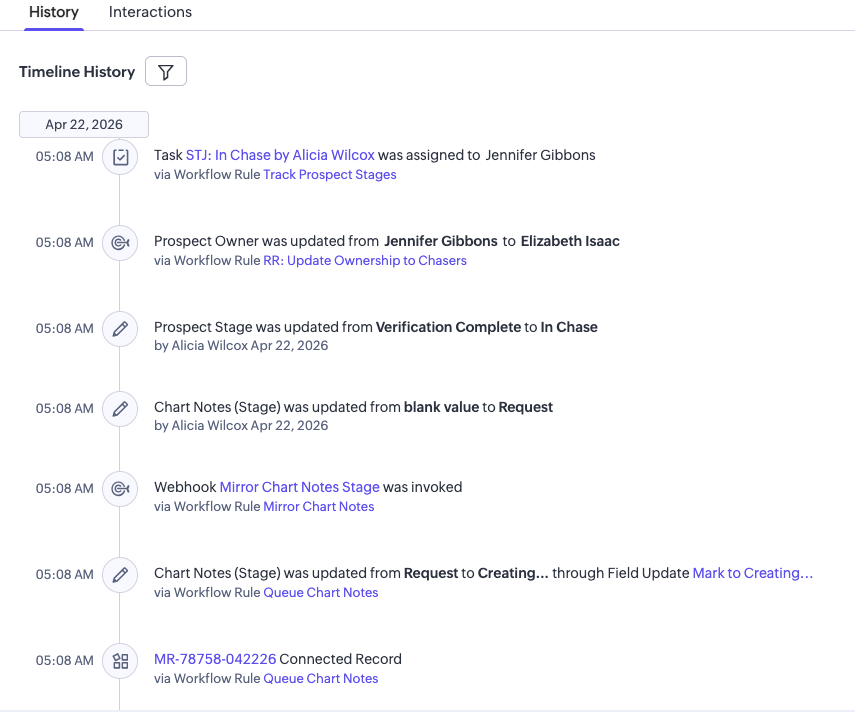
Track Prospect StagesStage ChangeLogs every stage transition for reporting, SLA tracking, and offline conversion signals
89-Step Zapier Mega-Automation
This is the engine of the entire system. Version 6 of the Full Benefit Report Zap uses 89 of Zapier's 100-step limit, with 6 branching decision paths that determine the prospect's fate.
1

Webhook Receives New Prospect Trigger

Zoho fires a webhook when a new prospect is created. The Zap receives all patient data including name, DOB, insurance info, and the Zoho record ID.

2

Pull Prospect Data + Get PVerify Token

Steps 2-4: Fetches the full prospect record from Zoho, obtains an API token from PVerify, and extracts the data fields needed for insurance lookup.

3

Insurance Discovery via PVerify

Step 5: Calls PVerify's Insurance Discovery API to find the patient's insurance plan. Posts the Insurance Discovery ID back to the Zoho prospect record.

First Decision Split — 4 Paths

Step 6: Based on Insurance Discovery results, the Zap splits into 4 branches:

Path A: PASSED — Insurance found. Continues to eligibility check.
Path B: FAILED — No insurance found. Updates Zoho and routes to Validator Warning.
Path C: Part B INACTIVE — Medicare Part B not active. Routes to Inactive Part B stage.
Path D: Advantage Plan — Medicare Advantage detected. Routes to Advantage Plan stage.
4

Eligibility Verification (Path A Only)

Steps 7-12: For prospects that PASSED insurance discovery — posts insurance info to Zoho, gets a new PVerify token, runs the Eligibility API call, and posts the Eligibility Summary ID + L2 Overview Link back to Zoho.

Second Decision Split — 6 Paths

Step 13: Based on eligibility results, splits into 6 more branches:

Path A1: Passed — Eligibility confirmed. Continues to SOS code check.
Path A2: Advantage Plan — Advantage plan detected at eligibility level.
Path A3: Failed — Eligibility check failed. Sub-splits into HMO, PPO, Failed with DOB, Failed with Subscriber Name.
Path A4: Invalid MBI Format — Medicare Beneficiary Identifier is malformed.
Path A5: MSP — Medicare Secondary Payer detected. Requires manual review.
Path A6: Inactive Part B — Part B inactive at eligibility level.
5

SOS Code Check (Path A1 Only)

Steps 14-18: For fully eligible prospects — updates Zoho module entry, gets a fresh PVerify token, then checks SOS (Schedule of Services) for both K-Codes and A-Codes. If no conflicts found, the Same/Similar check passes and the prospect advances to Verification Complete.

Sharon Sanford — Happy Path to In Chase
A real prospect who made it all the way through verification. Every event happened on April 21, 2026 within minutes of the form submission.
5:27

Prospect Created

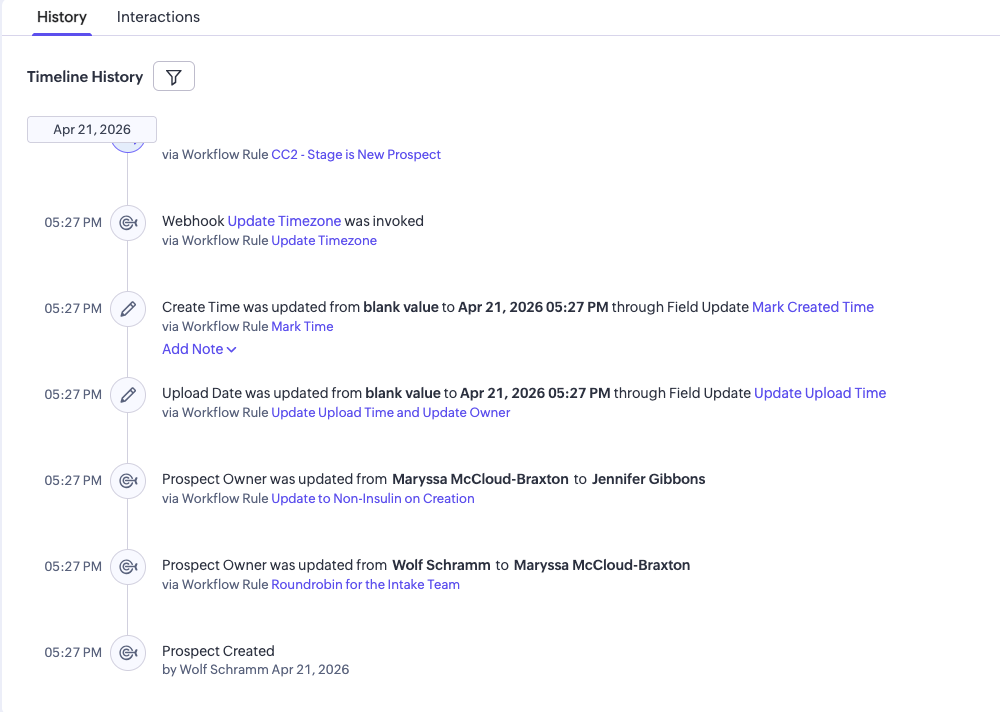
Created by Wolf Schramm at 5:27 PM. Immediately assigned via round-robin to Maryssa McCloud-Braxton, then reassigned to Jennifer Gibbons (Non-Insulin workflow). Upload Date and Create Time stamped. Timezone webhook fired.

5:27

Stage: New Prospect — Automations Fire

Confirmation email sent to Sharon. Confirming Request record created. Benefit Report created. ProspectID auto-filled. Backend sync + email-to-SMS address generated.

Email Sent Benefit Report ProspectID Backend Sync
5:27

PVerify: Insurance Discovery

Insurance status updated to "Found". Last Verification date set. Primary ID (5TV0XW1GF09) assigned by Wolf Schramm.

5:28

PVerify: Eligibility + Same/Similar

Eligibility: "Passed". Same/Similar went from "Pending" to "Passed". All 3 gates cleared. Track Prospect Stages workflow triggered.

Advanced to In Chase

Sharon Sanford successfully cleared all automated checks and advanced to the In Chase stage — ready for the STJ team to process the CGM order. Total time from form submission to In Chase: under 2 minutes.

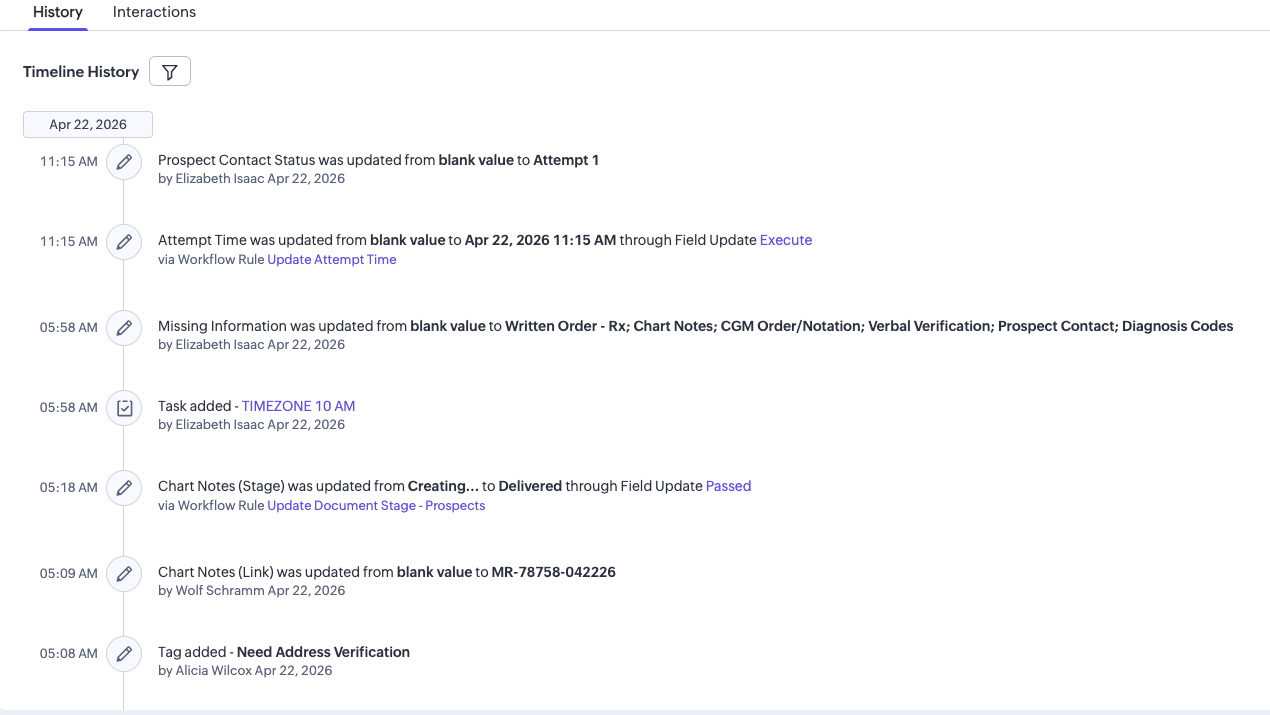
Zoho Timeline Screenshots

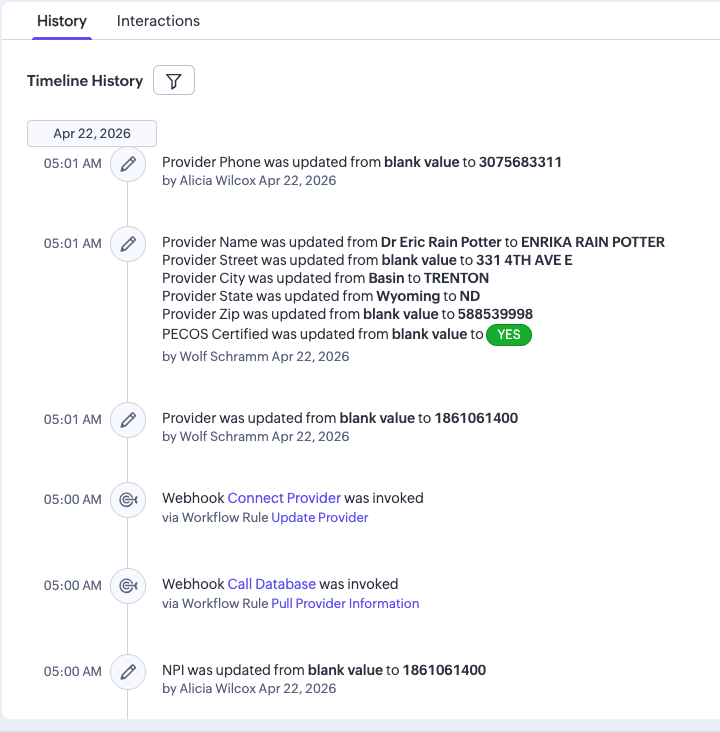
Timeline - Creation
Creation Phase — 8+ Workflow Rules Fire
Timeline - Automations
Email Sent + Benefit Report Created
Timeline - PVerify
PVerify — All 3 Gates Passed
Timeline - Stage tracking
Stage Tracking Triggered
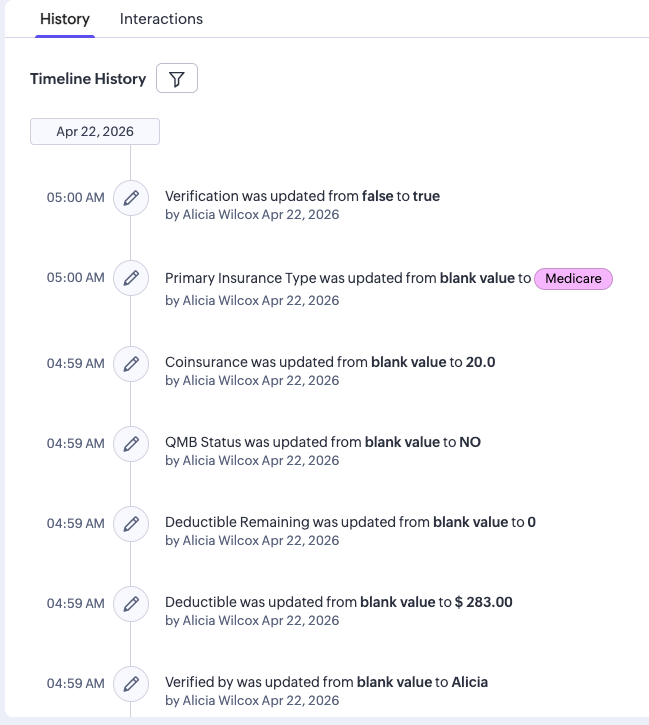
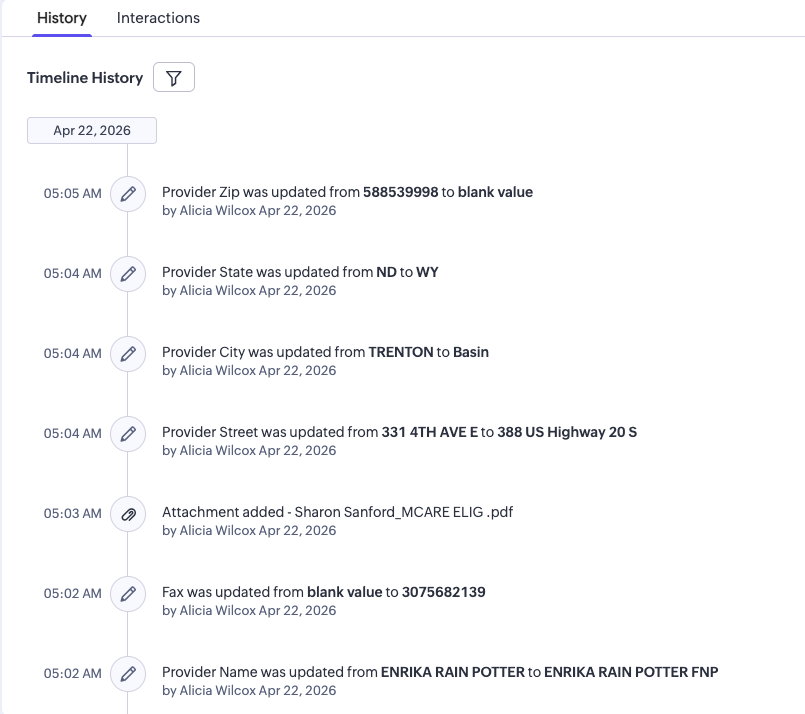
Timeline continued
Continued Timeline Events
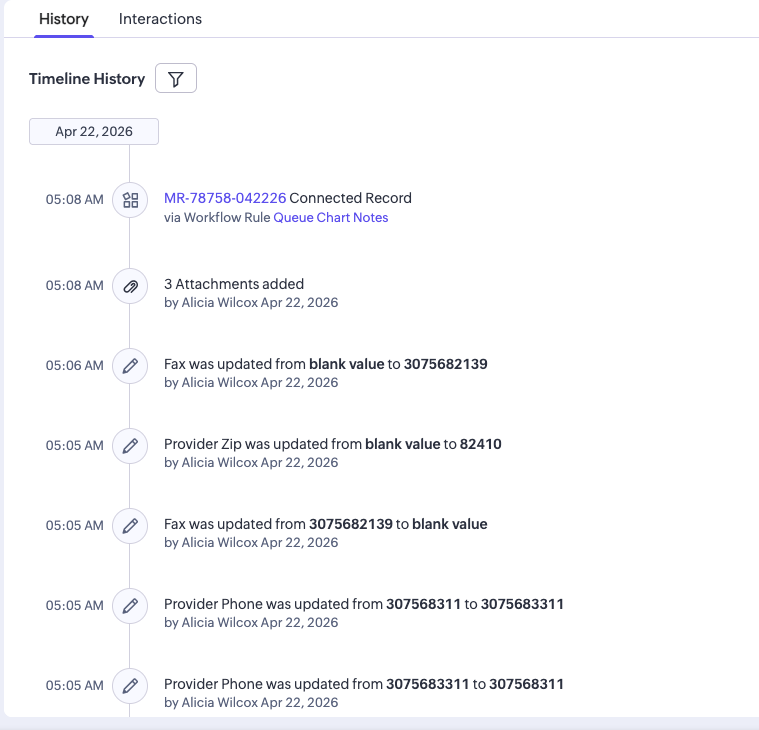
Timeline continued
Additional Timeline Events
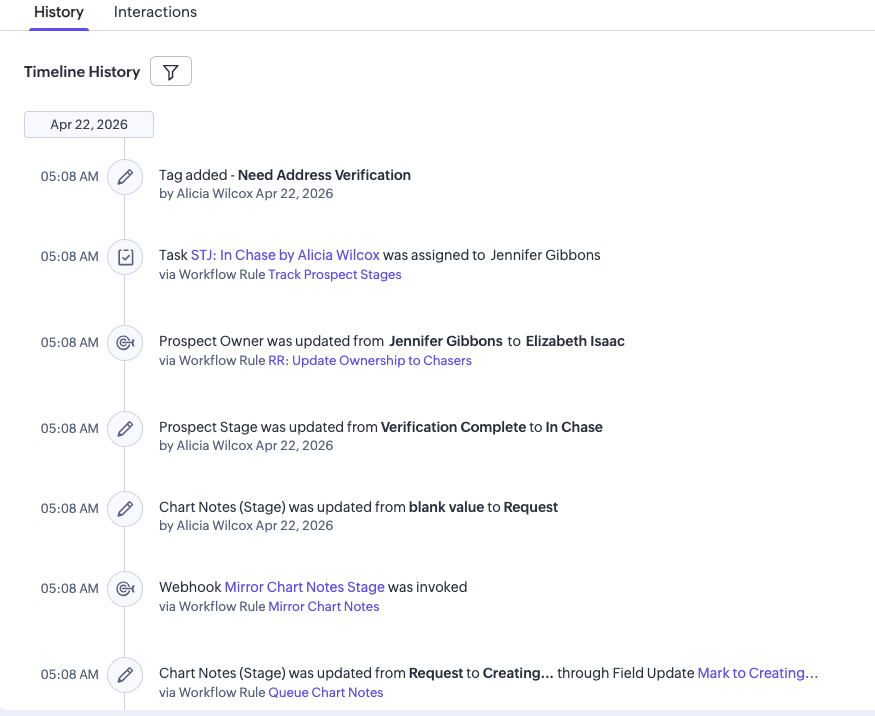
Timeline continued
Verification Events
Timeline continued
Advanced Processing
Timeline continued
Final Verification Steps
Timeline final
Near-Final Events
Timeline end
In Chase — Complete
How Everything Connects
6 systems working together — Google Ads and Meta Ads drive traffic, Zapier orchestrates data flow, Zoho CRM manages the pipeline, PVerify handles insurance, and conversion signals feed back to optimize ads.
G

Google Ads

V2 account with PMax General (workhorse) + Search. Receives offline conversion signals from Zoho CRM stages (In Chase, Sales) via GCLID matching.

M

Meta Ads

26 segment-based campaigns. CRM stage audiences (HMO, No Contact, Denied) are uploaded from Zoho for multi-channel retargeting.

Z

Zapier

4 core Zaps: Form-to-Zoho (v53), Timezone Normalization, Full Benefit Report (89 steps, v6), Primary ID Assignment. The orchestration layer.

CRM

Zoho CRM

Central prospect database. 15 workflow rules handle assignments, emails, verification tracking, and stage transitions. The source of truth for every prospect.

PV

PVerify

External insurance verification API. Runs 3 checks: Insurance Discovery, Eligibility Verification, and SOS Code Check (Same/Similar). Called via Zapier.

GHL

GoHighLevel

Handles patient communications — automated SMS sequences, email nurture campaigns, and follow-up scheduling. Connected to Zoho via Zapier.

The Closed-Loop Conversion Chain

This is what makes the system intelligent. Google Ads doesn't just know about form submissions — it knows which clicks turned into real patients.

Ad Click (GCLID captured) Form Submit Zoho: New Prospect Zoho: In Chase Zoho: Sales Google Ads: Offline Conversion

Each stage fires a conversion signal back to Google Ads, allowing the algorithm to optimize for clicks that produce qualified patients — not just form fills.